

A spreadsheet is often the first customer management tool a small business needs. It can store names, phone numbers, email addresses, and notes without the expense or complexity of a dedicated platform.
But as inquiries increase, the challenge changes. The business no longer needs only a list of contacts. It needs to know who spoke with each prospect, which estimates are outstanding, when to follow up, what was promised, and what work should happen after a sale.
That is where a customer relationship management system, or CRM, can become useful. The decision should be based on operational problems, not the assumption that every business needs more software.
Here are the warning signs that spreadsheets may no longer be enough and how to make the transition without creating unnecessary work.
When Spreadsheets Still Make Sense
Spreadsheets are flexible, familiar, and inexpensive. For a business with a small number of clients, one person managing relationships, and a straightforward sales process, they may be entirely adequate.
A carefully maintained sheet can record contact details, the last conversation, an estimate amount, and a next action. If someone consistently updates it, those records may meet the current need.
The problem is that a spreadsheet usually doesn’t enforce a workflow. It cannot automatically guarantee that someone owns a lead, follows up on time, or sees the latest conversation. Those gaps become more significant as the team and customer volume grow.
1. Follow-Ups Are Getting Forgotten
A prospect requests a quote, someone enters the information in a spreadsheet, and then the day becomes busy. The follow-up date passes unnoticed.
In many businesses, a lead doesn’t disappear because the customer was uninterested. It disappears because no one takes the next action.
A CRM can create tasks, assign owners, record due dates, and make overdue activities visible. Some systems also support appropriate reminders and automations.
What to evaluate
- Can every new inquiry be assigned to a specific person?
- Can the team see which leads have not received a response?
- Are estimate follow-ups visible without manually reviewing rows?
- Can communication automations stop when someone replies, declines, or opts out?
Good software supports accountability, but it still requires a clear process and staff who actually use it.
2. Customer Information Is Scattered Across Several Tools
Your customer details might be in one spreadsheet, estimate notes in another, emails in individual inboxes, and important text messages on an employee’s phone.
When a customer calls back, a team member may not know the last conversation, the agreed scope, or the next step. That can create confusion and force customers to repeat information.
A CRM provides shared contact records and a structured place to track relevant interactions and next steps, subject to the platform’s available integrations.
Before migrating, decide what information genuinely belongs in the shared record, how it should be protected, and who may access it. Not every private message or sensitive detail should be copied into a general customer database.
3. You Cannot Tell Where Opportunities Stand
A spreadsheet can contain a Status column, but a growing sales process often needs more than a manually updated label.
For example, a service business might use stages such as New Inquiry, Qualified, Estimate Scheduled, Estimate Sent, Pending Decision, Won, and Lost. The exact stages should reflect how the company actually sells.
A CRM can display opportunities by stage, show estimated values, and identify stalled deals. This makes it easier to see whether the problem is insufficient leads, delayed estimates, or weak follow-up after proposals.
A useful pipeline should be simple enough to maintain and detailed enough to help the team decide what to do next. Complicated stages that no one understands can be worse than a clear spreadsheet.
4. Multiple People Need to Work With the Same Contacts
As a company grows, it may have someone handling sales, another coordinating projects, and someone else answering customer questions. Sending copies of spreadsheets back and forth can create conflicting versions of the same records.
A shared CRM can provide a single working record with appropriate permissions. Team members can see assignments and context without relying on the file that happens to be newest.
Look for role-based access, auditability where needed, secure authentication, and clear rules about who may edit or export customer information.
The goal is not simply to store more data. It is to make collaboration more reliable while limiting access to people who need it.
5. Work Begins After the Sale, and the Handoff Is Messy
Winning a customer is often only the beginning. A contractor might need to schedule a job, assign tasks, track materials, and invoice the customer. A marketing agency may need to open a project, assign a team, and establish deliverables.
If those details must be retyped into several systems, mistakes and omissions become more likely.
Some CRM platforms integrate with project management, scheduling, estimates, invoices, and other operational tools. Others focus exclusively on sales and require additional applications.
Evaluate your actual process from inquiry to delivery. The best system is the one that supports the handoff without making the team work around unnecessary complexity.
6. You Cannot Measure Which Leads Turn Into Customers
Knowing that you received 100 inquiries does not tell you whether marketing is profitable.
Suppose one campaign produces 30 inquiries and two customers, while another produces ten inquiries and five customers. Without following leads through the sales process, the first campaign may appear more successful even when the second generates better outcomes.
A CRM can help track the original lead source, qualification, estimate, result, and sometimes associated revenue. It also makes it easier to distinguish raw inquiries from opportunities your business can actually serve.
Not every conversion will be attributable perfectly, particularly when customers interact across several channels. Still, consistent records can improve your decisions about website design, SEO, and Google Ads.
7. Customer Communication Is Becoming Inconsistent
One prospect receives a prompt response while another waits several days. Some estimates get a reminder and others do not. Customers may receive duplicated messages because two employees don’t realize someone has already replied.
These problems are signs of a workflow that depends too heavily on individual memory.
A CRM can support consistent internal tasks, message templates, and follow-up workflows. However, automation should never replace judgment or continue sending sales messages after a recipient has replied, unsubscribed, or been converted to an active customer.
Any email or text outreach must follow applicable consent, identification, and opt-out requirements. Record customer preferences and make sure the team can stop a workflow when circumstances change.
CRM vs. Spreadsheets: A Practical Comparison
| Capability | Spreadsheet | CRM |
|---|---|---|
| Basic contact list | Effective for simple needs | Structured contact records |
| Lead ownership | Manual assignment and oversight | Often includes assignment and task tracking |
| Sales pipeline | Manually organized rows or views | Dedicated stages and opportunity management |
| Follow-up reminders | Manual or custom setup | Commonly built into workflows |
| Communication history | Usually manually recorded | May integrate messages and activities |
| Team collaboration | Possible, but workflow is less structured | Typically supports shared roles and records |
| Reporting | Custom formulas and maintenance | Dashboards and pipeline reports, depending on product |
| Project and invoice handoff | Manual or separately connected | Depends on integrations and available modules |
| Cost and complexity | Usually low initial cost | Subscription, setup, training, and administration |
Neither approach is universally better. A CRM creates value when its additional capabilities solve problems that cost more than the system and its ongoing management.
How Much Does a CRM Actually Cost?
A software subscription is only one part of the cost. Depending on the platform, you may also pay for additional users, calling or messaging usage, integrations, importing data, setup, and staff training.
Calculate total annual cost, not just the advertised monthly price. If a system costs $1,000 per year but helps the business retain one profitable customer it otherwise would have missed, it might be worthwhile. If nobody uses it, even a free CRM provides little value.
Pricing, included users, and usage charges change over time, so confirm current provider terms and what happens when you add team members.
What to Look for Before Choosing a CRM
Choose based on requirements rather than the longest feature list.
- Ease of use: Can your team complete common tasks without extensive training?
- Contacts and pipeline: Can you customize stages to match how you sell?
- Follow-up: Can you assign tasks and see overdue activities?
- Integrations: Does it connect with your website, email, scheduling, and accounting workflow?
- Permissions and security: Can you limit access appropriately and protect customer information?
- Reporting: Can you track qualified opportunities, estimates, and outcomes?
- Data ownership: Can you export your contacts and history when needed?
- Cost: Are subscriptions, users, automation, messaging, and setup clearly priced?
- Support: What assistance is available when imports or workflows fail?
Pay particular attention to portability. You should understand how your customer records can be exported if your business changes systems later.
How to Move From a Spreadsheet to a CRM
Migration doesn’t need to be an all-at-once replacement of every business process. A phased rollout usually makes it easier to identify and correct mistakes.
- Clean your records. Remove duplicates, correct obvious errors, and determine which contacts are active.
- Define statuses and stages. Use language your staff already understands.
- Map the fields. Decide how names, companies, emails, phone numbers, lead sources, and notes should import.
- Test a small import. Confirm that records and relationships appear correctly before migrating everything.
- Assign ownership. Define who reviews new inquiries and manages follow-up.
- Train around real tasks. Practice creating a lead, scheduling a callback, sending an estimate, and completing a sale.
- Add automation gradually. Start with clear, measurable workflows and monitor them for failures.
- Review data and usage. Confirm that employees are keeping records current before retiring old processes.
Back up the original spreadsheet and preserve necessary historical records according to your business’s retention requirements. Avoid importing sensitive data that the new system does not need.
How Task Galaxy Fits Into the Process
Task Galaxy is designed to connect customer management with the work that follows a sale.
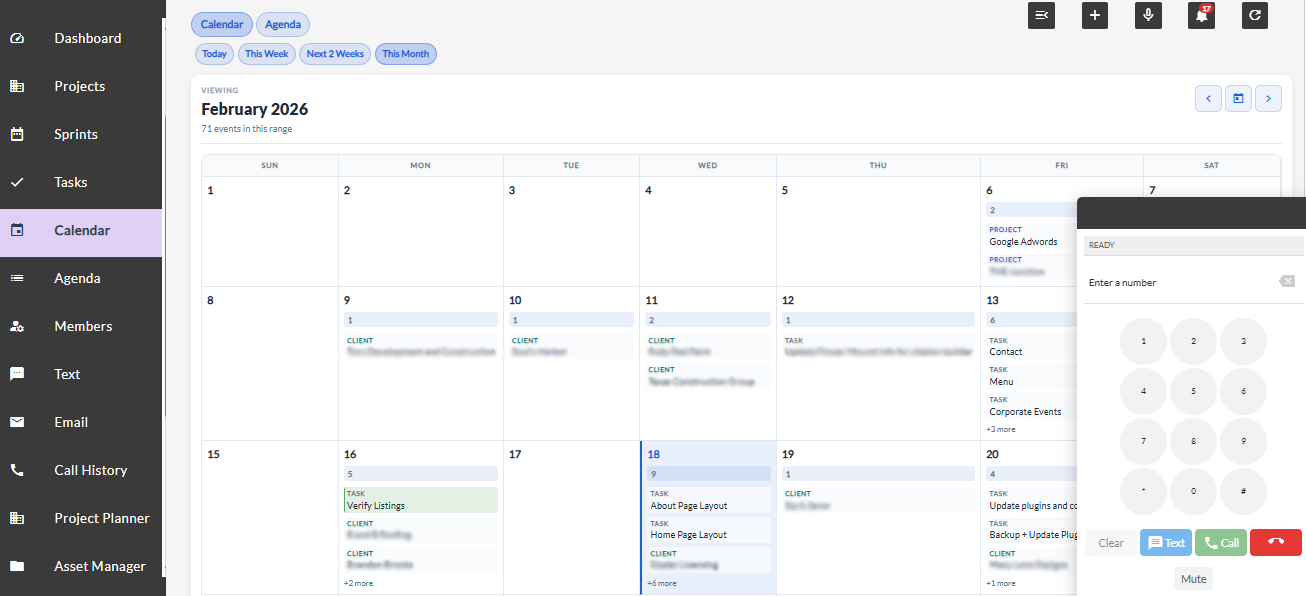
Businesses can organize contacts and leads, manage opportunities, assign tasks, plan projects, coordinate scheduling, prepare estimates and invoices, and use supported communication and automation workflows.
For example, a new website inquiry could be recorded as a lead, assigned to a team member, followed through an estimate process, and then connected to project work if the customer approves. The exact workflow depends on how the business configures the platform and which features are enabled.
The advantage of an integrated approach is less context lost between sales and operations, not simply having more features on one screen.
As with any business platform, review access permissions, integrations, data retention, pricing, and how staff will use the system before migrating important records.
When You Should Keep the Spreadsheet
A CRM is not automatically the right answer if your business manages a small number of relationships, has one person responsible for all follow-up, and doesn’t need complex scheduling or handoffs.
If the spreadsheet is accurate and consistently used, focus on strengthening the process rather than introducing software solely because the business is growing.
You can reassess when leads begin slipping through, more staff need access, reporting becomes difficult, or operational workflows require connections between systems.
The Right Time to Upgrade Is When the Process Needs It
Moving from spreadsheets to a CRM should improve the way your business operates. It should make customer information easier to find, follow-ups more reliable, sales opportunities more visible, and transitions into projects more organized.
The decision is less about your company size than about coordination and accountability. A small team with a complex sales process may benefit from a CRM sooner than a larger business with a few stable accounts.
At webpopular, we help businesses improve how their websites and marketing generate qualified inquiries. Through Task Galaxy, businesses can also explore ways to organize lead management, projects, scheduling, and follow-up.
If your team is spending more time managing spreadsheets than serving customers, explore Task Galaxy, contact webpopular, or request an instant quote to discuss your workflow.